
Blueprint to Brilliance: Mastering Wiring Diagram Creation for Industrial Projects
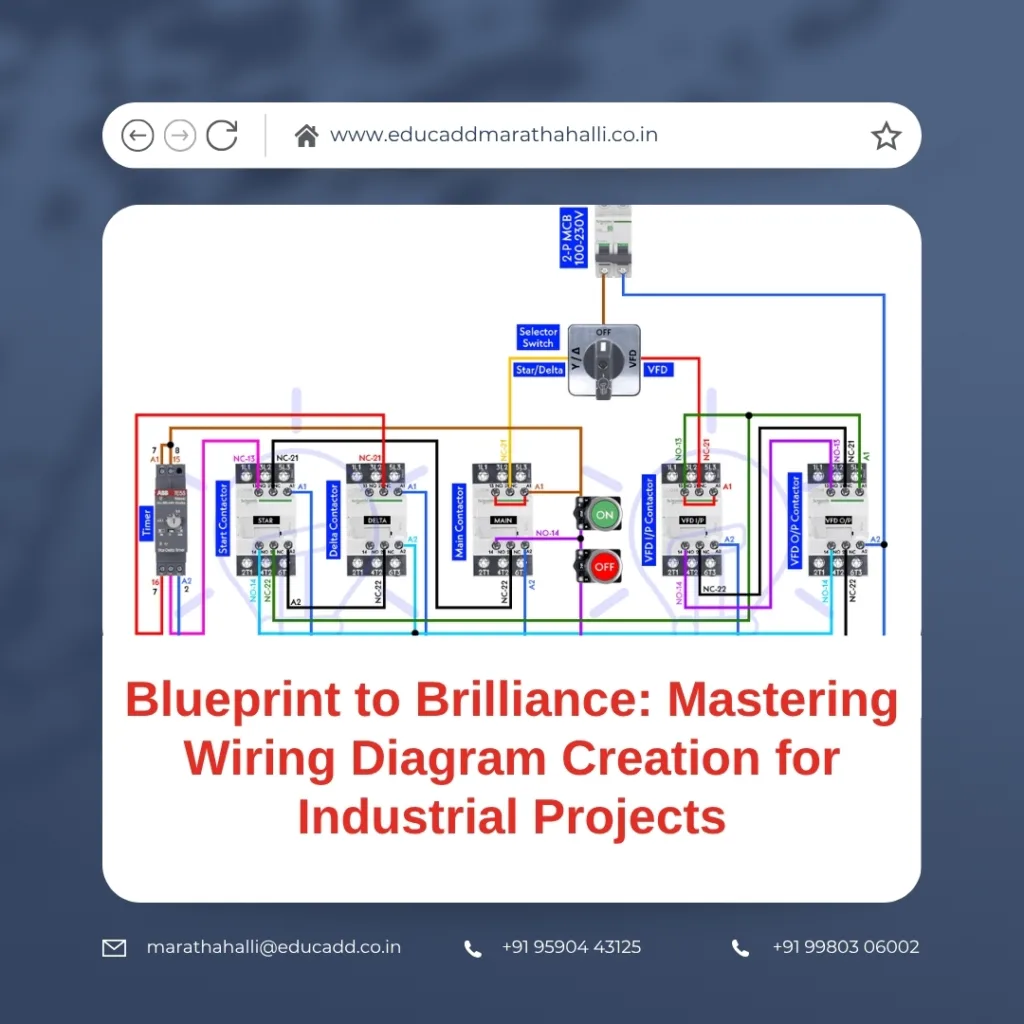
Industrial Wiring Diagram Creation
1. Why Wiring Diagrams Are the Backbone of Industrial Projects
In industrial environments, efficiency and safety aren’t optional—they’re essential. That’s why wiring diagram creation for industrial projects is such a vital part of the process. These diagrams are not just technical drawings. Instead, they are the communication bridge between engineers, electricians, and installers.
Imagine a massive factory floor filled with machinery, sensors, control panels, and power systems. Without a clear wiring diagram, managing connections, detecting faults, or even scaling up becomes a guessing game. This is precisely why wiring diagrams must be both precise and easy to interpret.
Moreover, they are crucial for:
-
Project planning: You get a visual understanding of how electrical systems are laid out.
-
Maintenance: Troubleshooting becomes far more efficient when you know exactly where everything connects.
-
Compliance: Proper diagrams ensure your installation follows industry safety standards and regulations.
From automation to heavy-duty production lines, wiring diagrams provide the clarity needed to transform ideas into real, functional systems. And for those starting their journey, understanding their structure and logic is the first step to mastering industrial electrical design.
2. Types of Wiring Diagrams You Must Know
Before diving into how to create wiring diagrams, it’s important to understand the different types that exist. Each diagram serves a different purpose and caters to a specific need within industrial projects.
a. Schematic Diagrams
Schematic diagrams are the go-to when you need to show logical flow. They don’t care about physical locations; instead, they illustrate how devices are logically connected. Used mostly for troubleshooting and control logic understanding, they’re essential for programmable logic controllers (PLCs) and automation systems.
b. Wiring Diagrams
These show actual wire connections between components. Unlike schematics, they consider real-world placement, terminal blocks, wire numbers, and cable types. When it’s time to do actual wiring, this diagram becomes your electrician’s best friend.
c. Single-Line Diagrams (SLDs)
SLDs provide a high-level overview of the entire system. They represent complex electrical systems using single lines and symbols. Useful for designing power distribution systems, SLDs help you visualize the system’s hierarchy and energy flow.
d. Panel Layouts
While not wiring diagrams in the traditional sense, panel layouts are still closely related. They show where each electrical component will be placed inside a control panel, making them essential for space planning.
e. Terminal Diagrams
These show terminal connections in junction boxes or control panels, helping wiring technicians make accurate, mistake-free connections.
Knowing when to use each type is key. A successful industrial project often includes multiple diagrams, each serving a distinct purpose but working together to form a complete picture.
3. How to Create Wiring Diagrams from Scratch
Now let’s get into the heart of wiring diagram creation for industrial projects. While tools and templates help, understanding the process step-by-step will ensure your diagrams are technically sound and professionally crafted.
Step 1: Define System Requirements
Start by gathering system inputs. These include the number of devices, their power requirements, voltage levels, sensor types, and control logic. Also, check compliance requirements like NEC, IEC, or IS standards depending on your location.
Step 2: Develop the Load List
A load list details each component’s power consumption, phase, and type. This list becomes your reference for determining wire sizes, protective devices, and circuit breakers.
Step 3: Select Components and Devices
This includes relays, breakers, contactors, switches, and control devices. Make sure to follow manufacturer datasheets and confirm current ratings.
Step 4: Draw a Preliminary Schematic
Start with simple shapes. Map out how components interact logically. Use this as your sandbox to tweak control logic, identify loops, and refine the design before detailing.
Step 5: Build the Detailed Wiring Diagram
Now comes the part where you connect terminals, wires, and ports:
-
Use CAD or electrical software like EPLAN, AutoCAD Electrical, or SolidWorks Electrical.
-
Insert symbols from a standards-based library.
-
Number each wire uniquely.
-
Indicate color codes for wires (e.g., red for live, blue for neutral).
-
Clearly define the ground, control, and power circuits.
Step 6: Add Supporting Details
Add legends, reference numbers, revision tracking, and BOM integration. If your software supports it, integrate real-time device references and PLC tag mappings.
Step 7: Validate and Review
Before finalizing, simulate or check for open circuits, incorrect voltages, or overloaded conductors. Peer review is a smart move here—fresh eyes often catch hidden issues.
Creating diagrams is part art, part science. When done correctly, they ensure smoother installations and long-term system reliability.
4. Software Tools That Simplify Diagram Design
Gone are the days of drawing diagrams on paper with rulers and pencils. With modern tools, you can build complex wiring diagrams in half the time—and with greater accuracy.
Here’s a comparison of top tools used for wiring diagram creation for industrial projects:
1. AutoCAD Electrical
-
Strength: Industry-standard, highly customizable
-
Best for: Professionals working with PLCs and automation
-
Key features: Symbol libraries, wire numbering, cross-referencing, real-time error checks
2. EPLAN Electric P8
-
Strength: Deep automation and database integration
-
Best for: Large-scale or multi-discipline engineering teams
-
Key features: Project synchronization, BoM generation, device tagging
3. SolidWorks Electrical
-
Strength: Great for electrical-mechanical integration
-
Best for: Teams collaborating across disciplines
-
Key features: 3D routing, panel layouts, integrated simulation
4. SmartDraw
-
Strength: Simple, browser-based interface
-
Best for: Beginners and small teams
-
Key features: Easy templates, drag-and-drop components
5. KiCAD and Fritzing
Although primarily for electronics, these open-source tools help hobbyists and students start practicing basic circuit layouts.
Choosing the right tool depends on your project size, team workflow, and long-term needs. Also, look for platforms that offer real-time collaboration, cloud storage, and symbol standardization.
Once you get comfortable with a tool, diagramming becomes faster, more precise, and scalable—even for complex industrial systems.
5. Final Tips to Succeed in Wiring Diagram Creation
Success in industrial wiring diagram design doesn’t just come from knowing how to use software. It comes from consistent habits, deep understanding, and practical exposure.
Let’s look at what can truly elevate your diagramming skill:
✅ Understand Circuit Theory
Software can’t replace logic. Understanding how electricity flows, what causes voltage drops, and how relays behave under different conditions is fundamental.
✅ Stay Consistent With Standards
Stick to IEC or ANSI symbols. Changing styles mid-project causes confusion. Many organizations adopt company-specific standards—learn them early.
✅ Keep It Simple and Readable
Avoid cramming everything into a single page. Use page numbers, references, and notes. If a technician can’t interpret your diagram in 5 minutes, it’s too complex.
✅ Label Everything
Wires, terminals, relays, switches—everything must be labeled. Clear labels speed up wiring, prevent errors, and ease future modifications.
✅ Backup Every Version
Wiring diagrams evolve over time. Without proper version control, you risk using outdated plans. Use cloud backup or project management tools with change logs.
✅ Collaborate With Electricians
Spend time in the field. See how technicians interpret your diagrams. The feedback you get here is invaluable for improving future designs.
✅ Keep Learning
The field of industrial automation is evolving. New devices, protocols, and safety norms are emerging. Stay updated through courses, webinars, and certifications.
Above all, think of your wiring diagram as a communication tool. Your goal isn’t just to design a system—it’s to ensure that anyone reading your diagram can implement it safely and accurately.
Conclusion
If you want to build a strong foundation in electrical design, start with Industrial Wiring Diagram Creation for industrial projects. Whether you’re designing a conveyor system, a packaging line, or an entire factory’s automation, your wiring diagram will be the thread that ties it all together.
By understanding diagram types, using the right tools, following a structured process, and learning from practical experiences, you set yourself apart as a reliable and skilled designer. And as industries grow more dependent on smart systems and automation, the demand for professionals who can communicate their ideas through clear wiring diagrams will only increase.

